Off-Ramp (Sell) Flow
This guide walks through the complete off-ramp integration — allowing your customers to sell crypto and receive fiat. The sell flow uses a two-phase process: Phase 1 generates a crypto deposit address, and Phase 2 submits beneficiary details for the fiat payout.
Flow Overview
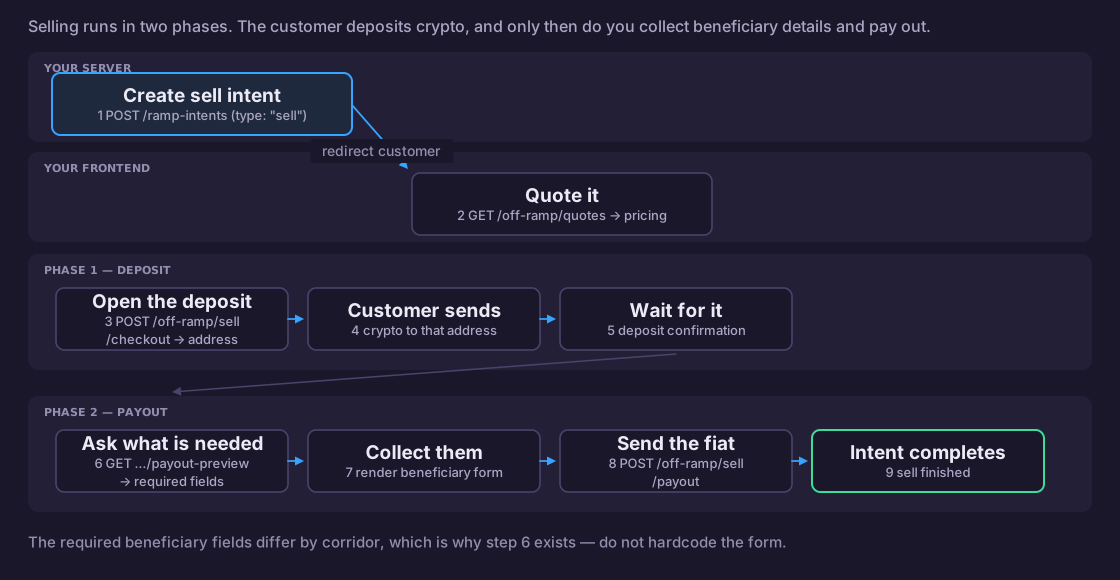
Step 1: Create a Sell Intent (Server-Side)
Create a ramp intent with type: "sell" from your backend.
- JavaScript
- Python
// Server-side — requires API key
const createSellIntent = async (customerEmail, walletAddress) => {
  const response = await fetch('https://api.zenpayz.com/payment/api/v1/ramp-intents', {
    method: 'POST',
    headers: {
      'Content-Type': 'application/json',
      'Authorization': `Bearer ${process.env.ZENPAYS_API_KEY}`,
      'x-merchant-id': process.env.ZENPAYS_MERCHANT_ID,
      'x-request-id': `req_${Date.now()}`,
    },
    body: JSON.stringify({
      type: 'sell',
      wallets: [{ network: 'tron', address: walletAddress }],
      fiatCurrency: 'USD',
      cryptoCurrency: 'usdt_tron',
      customerEmail,
      successUrl: 'https://yourapp.com/sell/success',
      cancelUrl: 'https://yourapp.com/sell/cancel',
    }),
  });

  const { data } = await response.json();
  return data; // { intentId, redirectUrl, expiresAt }
};
import requests
import os
import time

def create_sell_intent(customer_email: str, wallet_address: str):
    response = requests.post(
        "https://api.zenpayz.com/payment/api/v1/ramp-intents",
        headers={
            "Authorization": f"Bearer {os.environ['ZENPAYS_API_KEY']}",
            "x-merchant-id": os.environ["ZENPAYS_MERCHANT_ID"],
            "x-request-id": f"req_{int(time.time())}",
        },
        json={
            "type": "sell",
            "wallets": [{"network": "tron", "address": wallet_address}],
            "fiatCurrency": "USD",
            "cryptoCurrency": "usdt_tron",
            "customerEmail": customer_email,
            "successUrl": "https://yourapp.com/sell/success",
            "cancelUrl": "https://yourapp.com/sell/cancel",
        },
    )
    return response.json()["data"]
Step 2: Get Sell Quotes
Fetch quotes to show the customer how much fiat they'll receive for their crypto.
- JavaScript
- Python
const getSellQuotes = async (cryptoAmount) => {
  const params = new URLSearchParams({
    source: 'usdt_tron',
    destination: 'USD',
    amount: String(cryptoAmount),
  });

  const response = await fetch(
    `https://api.zenpayz.com/payment/api/v1/off-ramp/quotes?${params}`
  );
  const { data } = await response.json();

  data.quotes.forEach((quote) => {
    console.log(`Provider: ${quote.onramp}`);
    console.log(`  You send: ${quote.inputAmount} USDT`);
    console.log(`  You receive: ${quote.outputAmount} USD`);
    console.log(`  Rate: ${quote.rate}, Fee: ${quote.totalFee}`);
  });

  return data.quotes;
};

const quotes = await getSellQuotes(20);
const selectedQuote = quotes[0]; // Or let user choose
def get_sell_quotes(crypto_amount: float):
    response = requests.get(
        "https://api.zenpayz.com/payment/api/v1/off-ramp/quotes",
        params={
            "source": "usdt_tron",
            "destination": "USD",
            "amount": crypto_amount,
        },
    )
    quotes = response.json()["data"]["quotes"]

    for quote in quotes:
        print(f"Provider: {quote['onramp']}")
        print(f"  Send: {quote['inputAmount']} USDT → Receive: {quote['outputAmount']} USD")
        print(f"  Rate: {quote['rate']}, Fee: {quote['totalFee']}")
    return quotes
Step 3: Phase 1 — Create Sell Deposit
Generate a deposit address for the customer to send crypto to.
- JavaScript
- Python
const createDeposit = async (intentId, quote) => {
  const response = await fetch(
    'https://api.zenpayz.com/payment/api/v1/off-ramp/sell/checkout',
    {
      method: 'POST',
      headers: { 'Content-Type': 'application/json' },
      body: JSON.stringify({
        intentId,
        cryptoCurrency: 'USDT',
        chain: 'tron',
        fiatCurrency: 'USD',
        cryptoAmount: quote.inputAmount,
        fiatAmount: quote.outputAmount,
        rate: quote.rate,
        totalFee: quote.totalFee,
      }),
    }
  );

  const { data } = await response.json();

  // Display to customer
  console.log(`Send ${data.expectedCryptoAmount} ${data.currency} to:`);
  console.log(`Address: ${data.depositAddress}`);
  console.log(`Network: ${data.chain}`);
  if (data.memo) console.log(`Memo: ${data.memo}`);

  // Save for Phase 2
  return {
    cryptoDepositId: data.cryptoDepositId,
    depositAddress: data.depositAddress,
    expectedAmount: data.expectedCryptoAmount,
  };
};
def create_deposit(intent_id: str, quote: dict):
    response = requests.post(
        "https://api.zenpayz.com/payment/api/v1/off-ramp/sell/checkout",
        json={
            "intentId": intent_id,
            "cryptoCurrency": "USDT",
            "chain": "tron",
            "fiatCurrency": "USD",
            "cryptoAmount": quote["inputAmount"],
            "fiatAmount": quote["outputAmount"],
            "rate": quote["rate"],
            "totalFee": quote["totalFee"],
        },
    )
    data = response.json()["data"]

    print(f"Send {data['expectedCryptoAmount']} {data['currency']} to:")
    print(f"Address: {data['depositAddress']}")
    print(f"Network: {data['chain']}")

    return {
        "cryptoDepositId": data["cryptoDepositId"],
        "depositAddress": data["depositAddress"],
    }
Show the deposit address with a QR code and a countdown timer based on expiresAt. Remind the customer to send the exact expectedCryptoAmount on the correct chain.
Step 4: Wait for Deposit Confirmation
After the customer sends crypto, the system automatically detects and confirms the deposit. You can poll the intent status or listen for WebSocket events.
- JavaScript
- Python
const waitForDeposit = async (intentId) => {
  console.log('Waiting for crypto deposit...');

  while (true) {
    const response = await fetch(
      `https://api.zenpayz.com/payment/api/v1/ramp-intents/${intentId}`
    );
    const { data } = await response.json();
    const phase = data.intent.metadata?.phase;

    if (phase === 'awaiting_payout' || phase === 'completed') {
      console.log('Deposit confirmed!');
      return data.intent;
    }

    if (data.intent.status === 'expired' || data.intent.status === 'cancelled') {
      throw new Error(`Intent ${data.intent.status}`);
    }

    // Poll every 10 seconds
    await new Promise((resolve) => setTimeout(resolve, 10000));
  }
};
def wait_for_deposit(intent_id: str):
    print("Waiting for crypto deposit...")

    while True:
        response = requests.get(
            f"https://api.zenpayz.com/payment/api/v1/ramp-intents/{intent_id}"
        )
        data = response.json()["data"]
        phase = (data["intent"].get("metadata") or {}).get("phase")

        if phase in ("awaiting_payout", "completed"):
            print("Deposit confirmed!")
            return data["intent"]

        if data["intent"]["status"] in ("expired", "cancelled"):
            raise Exception(f"Intent {data['intent']['status']}")

        time.sleep(10)
Step 5: Phase 2a — Get Payout Preview
Once the deposit is confirmed, fetch the required beneficiary fields for the fiat payout.
- JavaScript
- Python
const getPayoutPreview = async (intentId, fiatCurrency, country = 'US') => {
  const params = new URLSearchParams({ intentId, fiatCurrency, country });

  const response = await fetch(
    `https://api.zenpayz.com/payment/api/v1/off-ramp/sell/payout-preview?${params}`
  );
  const { data } = await response.json();

  console.log(`Provider: ${data.tspDisplayName}`);
  console.log(`Payout: ${data.fiatAmount} ${data.fiatCurrency}`);
  console.log(`Fees: ${data.fees.total}`);
  console.log(`Required fields: ${data.requiredFields.length}`);

  return data;
};

const preview = await getPayoutPreview(intentId, 'USD', 'US');

// Dynamically render form from requiredFields
preview.requiredFields.forEach((field) => {
  // Create form inputs based on field.type, field.label, field.required, etc.
  console.log(`  ${field.required ? '*' : ' '} ${field.label} (${field.fieldName})`);
});
def get_payout_preview(intent_id: str, fiat_currency: str, country: str = "US"):
    response = requests.get(
        "https://api.zenpayz.com/payment/api/v1/off-ramp/sell/payout-preview",
        params={
            "intentId": intent_id,
            "fiatCurrency": fiat_currency,
            "country": country,
        },
    )
    data = response.json()["data"]

    print(f"Provider: {data['tspDisplayName']}")
    print(f"Payout: {data['fiatAmount']} {data['fiatCurrency']}")
    print(f"Fees: {data['fees']['total']}")
    print(f"\nRequired fields:")
    for field in data["requiredFields"]:
        print(f"  {'*' if field['required'] else ' '} {field['label']} ({field['fieldName']})")
    return data
Step 6: Phase 2b — Submit Payout
Collect the beneficiary details from the customer and submit the payout.
- JavaScript
- Python
const submitPayout = async (intentId, cryptoDepositId, beneficiaryDetails) => {
  const response = await fetch(
    'https://api.zenpayz.com/payment/api/v1/off-ramp/sell/payout',
    {
      method: 'POST',
      headers: { 'Content-Type': 'application/json' },
      body: JSON.stringify({
        intentId,
        cryptoDepositId,
        fiatCurrency: 'USD',
        country: 'US',
        beneficiaryDetails,
      }),
    }
  );

  const { data } = await response.json();

  console.log(`Payout ID: ${data.payoutId}`);
  console.log(`Status: ${data.status}`);
  console.log(`Amount: ${data.amount} ${data.currency}`);

  return data;
};

// Example: customer filled in the form
const payout = await submitPayout(intentId, deposit.cryptoDepositId, {
  receiverFirstName: 'John',
  receiverLastName: 'Doe',
  receiverCountry: 'US',
  receiverAccountNumber: '123456789',
  receiverBankName: 'Bank of America',
  receiverBankCode: 'BOFAUS3N',
  receiverAddressLine1: '123 Main St',
  receiverCity: 'New York',
  receiverState: 'NY',
  receiverPinCode: '10001',
  remittancePurpose: 'PAYP001 - Family Support',
  sourceOfFund: 'PAYF001 - Salary',
  relationship: 'PAYR001 - Self',
});

// Intent is now completed — redirect customer
window.location.href = '/sell/success';
def submit_payout(intent_id: str, crypto_deposit_id: str, beneficiary_details: dict):
    response = requests.post(
        "https://api.zenpayz.com/payment/api/v1/off-ramp/sell/payout",
        json={
            "intentId": intent_id,
            "cryptoDepositId": crypto_deposit_id,
            "fiatCurrency": "USD",
            "country": "US",
            "beneficiaryDetails": beneficiary_details,
        },
    )
    data = response.json()["data"]
    print(f"Payout ID: {data['payoutId']}")
    print(f"Status: {data['status']}")
    print(f"Amount: {data['amount']} {data['currency']}")
    return data

# Example
payout = submit_payout(intent_id, deposit["cryptoDepositId"], {
    "receiverFirstName": "John",
    "receiverLastName": "Doe",
    "receiverCountry": "US",
    "receiverAccountNumber": "123456789",
    "receiverBankName": "Bank of America",
    "receiverBankCode": "BOFAUS3N",
    "receiverAddressLine1": "123 Main St",
    "receiverCity": "New York",
    "receiverState": "NY",
    "receiverPinCode": "10001",
    "remittancePurpose": "PAYP001 - Family Support",
    "sourceOfFund": "PAYF001 - Salary",
    "relationship": "PAYR001 - Self",
})
Step 7: Receive Webhook Notification
After the payout is submitted (or if it fails), ZenPay delivers a webhook to your configured endpoint.
ramp.completed — fiat payout has been submitted successfully:
{
  "event_type": "ramp.completed",
  "payment_data": {
    "merchant_id": "m_abc123",
    "intentId": "ri_1710345678000_a1b2c3d4e5f6g7h8",
    "type": "sell",
    "status": "completed",
    "fiatCurrency": "USD",
    "cryptoCurrency": "usdt_tron",
    "amount": 20,
    "payoutId": "po_xyz789",
    "payoutAmount": 19.50,
    "payoutCurrency": "USD",
    "completedAt": "2026-03-16T14:30:00.000Z"
  }
}
ramp.failed — payout submission failed:
{
  "event_type": "ramp.failed",
  "payment_data": {
    "merchant_id": "m_abc123",
    "intentId": "ri_1710345678000_a1b2c3d4e5f6g7h8",
    "type": "sell",
    "status": "failed",
    "fiatCurrency": "USD",
    "cryptoCurrency": "usdt_tron",
    "amount": 20,
    "reason": "Payout submission failed",
    "failedAt": "2026-03-16T14:30:00.000Z"
  }
}
We recommend using webhooks as the primary notification mechanism. Webhooks are delivered as soon as the ramp completes or fails — no delay. See the Webhooks guide for setup, signature verification, and retry behavior.
Complete Example
- JavaScript
- Python
// Full off-ramp flow
const runSellFlow = async () => {
  // Step 1: Create intent (server-side)
  const intent = await createSellIntent('customer@example.com', 'TLfMk...');
  console.log(`Intent: ${intent.intentId}`);

  // Step 2: Get quotes
  const quotes = await getSellQuotes(20);
  const selectedQuote = quotes[0];

  // Step 3: Phase 1 — create deposit
  const deposit = await createDeposit(intent.intentId, selectedQuote);
  console.log(`Send USDT to: ${deposit.depositAddress}`);

  // Step 4: Wait for deposit confirmation
  await waitForDeposit(intent.intentId);

  // Step 5: Phase 2a — get payout preview
  const preview = await getPayoutPreview(intent.intentId, 'USD', 'US');

  // Step 6: Phase 2b — submit payout (with customer's details)
  const payout = await submitPayout(intent.intentId, deposit.cryptoDepositId, {
    receiverFirstName: 'John',
    receiverLastName: 'Doe',
    receiverCountry: 'US',
    receiverAccountNumber: '123456789',
    receiverBankName: 'Bank of America',
    // ... other fields from preview.requiredFields
  });

  console.log(`Done! Payout ${payout.payoutId} is ${payout.status}`);
};
def run_sell_flow():
    # Step 1: Create intent
    intent = create_sell_intent("customer@example.com", "TLfMk...")
    print(f"Intent: {intent['intentId']}")

    # Step 2: Get quotes
    quotes = get_sell_quotes(20)
    selected_quote = quotes[0]

    # Step 3: Phase 1 — create deposit
    deposit = create_deposit(intent["intentId"], selected_quote)

    # Step 4: Wait for deposit confirmation
    wait_for_deposit(intent["intentId"])

    # Step 5: Phase 2a — get payout preview
    preview = get_payout_preview(intent["intentId"], "USD", "US")

    # Step 6: Phase 2b — submit payout
    payout = submit_payout(intent["intentId"], deposit["cryptoDepositId"], {
        "receiverFirstName": "John",
        "receiverLastName": "Doe",
        "receiverCountry": "US",
        "receiverAccountNumber": "123456789",
        "receiverBankName": "Bank of America",
    })

    print(f"Done! Payout {payout['payoutId']} is {payout['status']}")

run_sell_flow()
Error Handling
| Phase | Error | Recovery |
|---|---|---|
| Intent creation | Validation error | Check required fields and retry |
| Deposit (Phase 1) | Intent expired | Create a new intent |
| Deposit (Phase 1) | Deposit address generation failed | Retry — endpoint is idempotent |
| Waiting | Deposit not detected | Ensure correct chain and address; check with block explorer |
| Payout preview | Deposit not confirmed | Wait longer for blockchain confirmation |
| Payout (Phase 2) | FX quotation failed | Retry — the system will obtain a new quote |
| Payout (Phase 2) | Insufficient amount (fees > value) | Customer sent too little crypto |
Next Steps
- Create Ramp Intent — API reference
- Sell Quotes — Quote endpoint details
- Create Sell Deposit — Phase 1 reference
- Get Payout Preview — Phase 2a reference
- Submit Sell Payout — Phase 2b reference
- On-Ramp Flow — Buy crypto integration guide