On-Ramp (Buy) Flow
This guide walks through the complete on-ramp integration — allowing your customers to buy crypto with fiat. The flow uses ramp intents to track the entire lifecycle from creation to completion.
Flow Overview
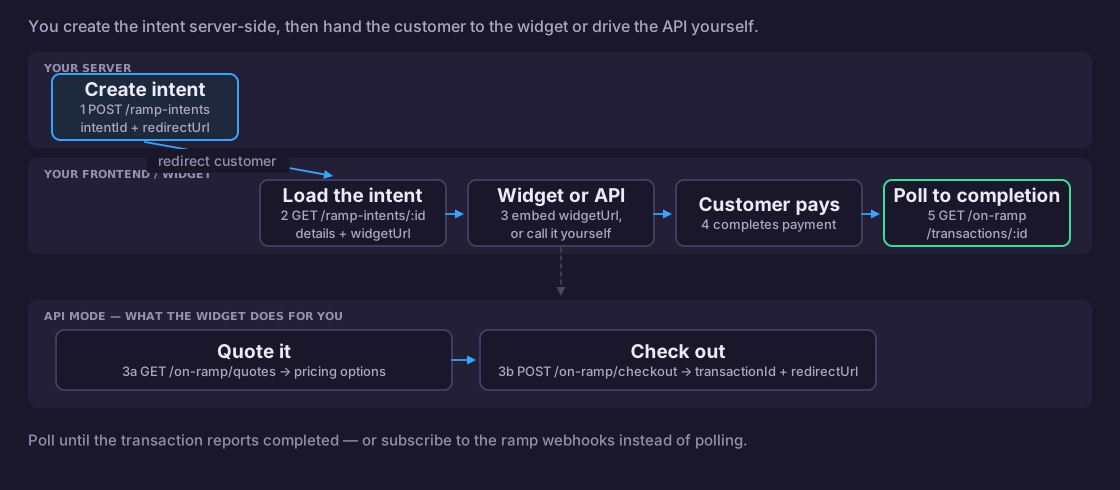
Step 1: Create a Ramp Intent (Server-Side)
Create a ramp intent from your backend. This requires your API key and merchant ID.
- JavaScript
- Python
// Server-side — requires API key
const createBuyIntent = async (customerEmail, walletAddress) => {
  const response = await fetch('https://api.zenpayz.com/payment/api/v1/ramp-intents', {
    method: 'POST',
    headers: {
      'Content-Type': 'application/json',
      'Authorization': `Bearer ${process.env.ZENPAYS_API_KEY}`,
      'x-merchant-id': process.env.ZENPAYS_MERCHANT_ID,
      'x-request-id': `req_${Date.now()}`,
    },
    body: JSON.stringify({
      type: 'buy',
      wallets: [{ network: 'ethereum', address: walletAddress }],
      fiatCurrency: 'USD',
      cryptoCurrency: 'eth_ethereum',
      amount: 100,
      customerEmail,
      successUrl: 'https://yourapp.com/buy/success',
      cancelUrl: 'https://yourapp.com/buy/cancel',
    }),
  });

  const { data } = await response.json();
  // data = { intentId, redirectUrl, expiresAt }
  return data;
};
import requests
import os
import time

def create_buy_intent(customer_email: str, wallet_address: str):
    response = requests.post(
        "https://api.zenpayz.com/payment/api/v1/ramp-intents",
        headers={
            "Authorization": f"Bearer {os.environ['ZENPAYS_API_KEY']}",
            "x-merchant-id": os.environ["ZENPAYS_MERCHANT_ID"],
            "x-request-id": f"req_{int(time.time())}",
        },
        json={
            "type": "buy",
            "wallets": [{"network": "ethereum", "address": wallet_address}],
            "fiatCurrency": "USD",
            "cryptoCurrency": "eth_ethereum",
            "amount": 100,
            "customerEmail": customer_email,
            "successUrl": "https://yourapp.com/buy/success",
            "cancelUrl": "https://yourapp.com/buy/cancel",
        },
    )
    return response.json()["data"]
Step 2: Redirect Customer to Widget
Send the customer to the redirectUrl from Step 1, or fetch the intent on your frontend to get the widget URL for iframe embedding.
- JavaScript
- Python
// Option A: Simple redirect
window.location.href = intentData.redirectUrl;

// Option B: Fetch intent and embed widget in iframe
const fetchAndEmbed = async (intentId) => {
  const response = await fetch(
    `https://api.zenpayz.com/payment/api/v1/ramp-intents/${intentId}`
  );
  const { data } = await response.json();

  // Terminal lifecycle states
  if (data.intent.status === 'expired') {
    showError('This session has expired. Please start again.');
    return;
  }
  if (data.intent.status === 'cancelled') {
    // When KYC is declined the intent transitions to cancelled with
    // cancelReason='kyc_rejected'. See get-ramp-intent for details.
    showError(
      data.intent.cancelReason === 'kyc_rejected'
        ? 'Identity verification could not be completed.'
        : 'This session has been cancelled.'
    );
    return;
  }

  // KYC gate — surface a friendly state-specific message
  switch (data.intent.kycStatus) {
    case 'in_review':
      showInfo('Verification under review — we\'ll continue automatically once approved.');
      return;
    case 'pending':
      // Customer needs to start / finish verification. If `kycRequired` is
      // present in the response and `kycVerificationUrl` is set, embed it;
      // otherwise call initiate-kyc to create a session.
      break;
  }

  if (data.widgetUrl) {
    const iframe = document.createElement('iframe');
    iframe.src = data.widgetUrl;
    iframe.style.cssText = 'width:100%;height:600px;border:none;border-radius:12px;';
    iframe.allow = 'payment';
    document.getElementById('widget-container').appendChild(iframe);
  }
};
# Server-side: return the redirect URL to your frontend
def get_intent_widget(intent_id: str):
    response = requests.get(
        f"https://api.zenpayz.com/payment/api/v1/ramp-intents/{intent_id}"
    )
    data = response.json()["data"]

    if data["intent"]["status"] == "expired":
        raise Exception("Intent expired")

    return {
        "intent": data["intent"],
        "widgetUrl": data["widgetUrl"],
    }
Step 3: Get Quotes (API Mode)
If you're building a custom UI instead of using the widget, fetch buy quotes to show pricing options.
- JavaScript
- Python
const getQuotes = async (source, destination, amount) => {
  const params = new URLSearchParams({ source, destination, amount: String(amount) });

  const response = await fetch(
    `https://api.zenpayz.com/payment/api/v1/on-ramp/quotes?${params}`
  );
  const { data } = await response.json();

  // data.quotes = array of quote options
  data.quotes.forEach((quote) => {
    console.log(`${quote.onramp}: ${quote.outputAmount} crypto`);
    console.log(`  Rate: ${quote.rate}, Fee: ${quote.totalFee}`);
    console.log(`  Payment: ${quote.paymentMethod}`);
    if (quote.recommended) console.log('  ⭐ Recommended');
  });

  return data.quotes;
};

const quotes = await getQuotes('usd', 'eth_ethereum', 100);
def get_quotes(source: str, destination: str, amount: float):
    response = requests.get(
        "https://api.zenpayz.com/payment/api/v1/on-ramp/quotes",
        params={
            "source": source,
            "destination": destination,
            "amount": amount,
        },
    )
    quotes = response.json()["data"]["quotes"]

    for quote in quotes:
        print(f"{quote['onramp']}: {quote['outputAmount']} crypto")
        print(f"  Rate: {quote['rate']}, Fee: {quote['totalFee']}")
    return quotes
Step 4: Create Checkout
After the customer selects a quote, create a checkout to start the payment.
- JavaScript
- Python
const createCheckout = async (selectedQuote, walletAddress) => {
  const response = await fetch(
    'https://api.zenpayz.com/payment/api/v1/on-ramp/checkout',
    {
      method: 'POST',
      headers: { 'Content-Type': 'application/json' },
      body: JSON.stringify({
        onramp: selectedQuote.onramp,
        source: 'usd',
        destination: 'eth_ethereum',
        amount: 100,
        type: 'buy',
        paymentMethod: selectedQuote.paymentMethod,
        walletAddress,
      }),
    }
  );

  const { data } = await response.json();
  // Redirect to payment page
  window.location.href = data.redirectUrl;
};
def create_checkout(selected_quote, wallet_address: str):
    response = requests.post(
        "https://api.zenpayz.com/payment/api/v1/on-ramp/checkout",
        json={
            "onramp": selected_quote["onramp"],
            "source": "usd",
            "destination": "eth_ethereum",
            "amount": 100,
            "type": "buy",
            "paymentMethod": selected_quote["paymentMethod"],
            "walletAddress": wallet_address,
        },
    )
    return response.json()["data"]
Step 5: Poll Transaction Status
After the customer completes payment, poll the transaction status until it reaches a terminal state.
- JavaScript
- Python
const pollTransaction = async (transactionId) => {
  const terminalStatuses = ['completed', 'failed', 'expired', 'refunded'];

  while (true) {
    const response = await fetch(
      `https://api.zenpayz.com/payment/api/v1/on-ramp/transactions/${transactionId}`
    );
    const { data } = await response.json();

    console.log(`Status: ${data.status}`);

    if (terminalStatuses.includes(data.status)) {
      return data;
    }

    // Wait 5 seconds before next poll
    await new Promise((resolve) => setTimeout(resolve, 5000));
  }
};

const result = await pollTransaction('txn_abc123');

if (result.status === 'completed') {
  console.log(`Success! ${result.outAmount} crypto delivered`);
  console.log(`TX Hash: ${result.transactionHash}`);
} else {
  console.log(`Transaction ${result.status}`);
}
import time

def poll_transaction(transaction_id: str):
    terminal = {"completed", "failed", "expired", "refunded"}

    while True:
        response = requests.get(
            f"https://api.zenpayz.com/payment/api/v1/on-ramp/transactions/{transaction_id}"
        )
        data = response.json()["data"]
        print(f"Status: {data['status']}")

        if data["status"] in terminal:
            return data

        time.sleep(5)

result = poll_transaction("txn_abc123")
if result["status"] == "completed":
    print(f"Success! {result['outAmount']} crypto delivered")
Step 6: Receive Webhook Notification
Instead of polling (or in addition to it), you can receive a webhook when the ramp completes or fails. Configure your webhook URL in the merchant dashboard.
ramp.completed — crypto has been sent to the customer's wallet:
{
  "event_type": "ramp.completed",
  "payment_data": {
    "merchant_id": "m_abc123",
    "intentId": "ri_1710345678000_a1b2c3d4e5f6g7h8",
    "type": "buy",
    "status": "completed",
    "fiatCurrency": "USD",
    "cryptoCurrency": "eth_ethereum",
    "amount": 100,
    "chain": "ethereum",
    "destinationAddress": "0x742d35Cc6634C0532925a3b844Bc9e7595f2bD28",
    "fireblocksTxId": "fb_tx_9a8b7c6d5e4f",
    "completedAt": "2026-03-16T14:30:00.000Z"
  }
}
ramp.failed — crypto send failed:
{
  "event_type": "ramp.failed",
  "payment_data": {
    "merchant_id": "m_abc123",
    "intentId": "ri_1710345678000_a1b2c3d4e5f6g7h8",
    "type": "buy",
    "status": "failed",
    "fiatCurrency": "USD",
    "cryptoCurrency": "eth_ethereum",
    "amount": 100,
    "reason": "Crypto send failed",
    "failedAt": "2026-03-16T14:30:00.000Z"
  }
}
We recommend using webhooks as the primary notification mechanism and polling as a fallback. Webhooks are delivered as soon as the status changes — no delay. See the Webhooks guide for setup instructions, signature verification, and retry behavior.
Intent Status Lifecycle
created  →  active  →  completed
                   →  cancelled
                   →  expired (auto, after 1 hour)
| Status | Description |
|---|---|
created | Intent created, not yet accessed |
active | Customer has accessed the intent (first GET) |
completed | Transaction completed successfully |
cancelled | Manually cancelled by merchant or customer |
expired | Auto-expired after 1 hour |
Error Handling
- Intent expired: Create a new intent and redirect the customer
- Quote expired: Fetch fresh quotes — prices change frequently
- Payment failed: Check the transaction status for details; the customer can retry
- Network errors: Implement retry with exponential backoff
Next Steps
- Create Ramp Intent — API reference
- Buy Quotes — Quote endpoint details
- Buy Checkout — Checkout endpoint details
- Transaction Status — Status polling details
- Off-Ramp Flow — Sell crypto integration guide