Create Payout Intent
Create a payout intent. Returns the fields you need to collect before confirming the payout.
POST
https://api.zenpayz.com/payment/api/v1/payout-intentsBearer · API key
Request
Headers
| Header | Description |
|---|---|
Authorization REQUIRED | Bearer {api_key} |
X-Signature REQUIRED | HMAC-SHA256 signature |
X-Timestamp REQUIRED | ISO 8601 timestamp |
X-Secret-Salt REQUIRED | Secret salt for HMAC validation |
Content-Type REQUIRED | application/json |
X-Idempotency-Key OPTIONAL | Unique key to prevent duplicates |
Body Parameters
| Parameter | Type | Description |
|---|---|---|
amount REQUIRED | number | Payout amount (must be > 0) |
currency REQUIRED | string | Currency code (e.g. USD, INR, USDT) |
country OPTIONAL | string | ISO 3166-1 alpha-2 country code |
beneficiaryName REQUIRED | string | Beneficiary full name |
beneficiaryEmail OPTIONAL | string | Beneficiary email |
beneficiaryPhone OPTIONAL | string | Beneficiary phone |
payoutType OPTIONAL | string | bank_transfer, upi, imps, neft, rtgs |
purpose OPTIONAL | string | Purpose (e.g. PAYOUT, SALARY, REFUND) |
description OPTIONAL | string | Description |
customerId OPTIONAL | string | Your customer ID |
webhookUrl OPTIONAL | string | URL for payout status webhooks |
metadata OPTIONAL | object | Custom key-value pairs (e.g. { "order_no": "ORD-001" }). Echoed back in all webhook callbacks for this payout. |
Response
Success (200 OK)
{
  "success": true,
  "data": {
    "intentId": "poi_xxxxx",
    "status": "requires_confirmation",
    "amount": 10000,
    "currency": "INR",
    "beneficiaryName": "John Doe",
    "requiredFields": [
      {
        "fieldName": "beneficiaryAccount",
        "label": "Account Number",
        "type": "text",
        "required": true,
        "placeholder": "Bank account number"
      },
      {
        "fieldName": "beneficiaryIfsc",
        "label": "IFSC Code",
        "type": "text",
        "required": true,
        "placeholder": "e.g. HDFC0001234"
      }
    ],
    "optionalFields": [
      {
        "fieldName": "beneficiaryEmail",
        "label": "Email",
        "type": "text",
        "required": false
      }
    ],
    "expiresAt": "2024-01-15T11:00:00.000Z",
    "createdAt": "2024-01-15T10:30:00.000Z"
  }
}
For crypto payouts (e.g. currency: "USDT"), the required fields will be:
{
  "requiredFields": [
    {
      "fieldName": "chain",
      "label": "Network / Chain",
      "type": "select",
      "required": true,
      "options": ["ethereum", "tron", "bitcoin", "solana", "polygon"]
    },
    {
      "fieldName": "walletAddress",
      "label": "Wallet Address",
      "type": "text",
      "required": true
    }
  ]
}
Error Responses
| Code | HTTP | Message |
|---|---|---|
| PAYOUT_INTENT_CREATE_FAILED | 400 | Invalid request or insufficient wallet balance |
| UNAUTHORIZED | 401 | Invalid API key |
Examples
- cURL
- SDK
curl -X POST https://api.zenpayz.com/payment/api/v1/payout-intents \
  -H "Authorization: Bearer zp_test_xxxxx" \
  -H "X-Timestamp: 2024-01-15T10:30:00.000Z" \
  -H "X-Signature: a1b2c3d4e5f6..." \
  -H "X-Secret-Salt: your_secret_salt" \
  -H "Content-Type: application/json" \
  -d '{
    "amount": 10000,
    "currency": "INR",
    "country": "IN",
    "beneficiaryName": "John Doe",
    "beneficiaryEmail": "john@example.com",
    "purpose": "PAYOUT"
  }'
const intent = await zenpays.payouts.createPayoutIntent({
  amount: 10000,
  currency: 'INR',
  country: 'IN',
  beneficiaryName: 'John Doe',
  beneficiaryEmail: 'john@example.com',
  purpose: 'PAYOUT',
})

// Now collect the required fields from intent.requiredFields
console.log(intent.requiredFields)
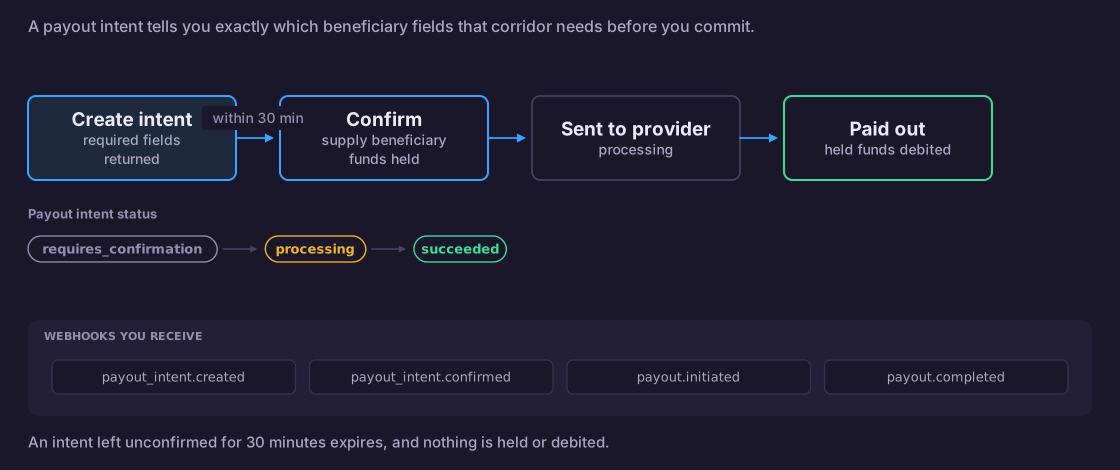
How It Works
- You send basic payout details (amount, currency, beneficiary name)
- ZenPays returns the exact fields you need to collect
- You collect those fields from your user or your system
- You confirm the intent with those fields
- The payout is executed
The intent expires after 30 minutes. If not confirmed, create a new one.