Create Refund
Create a refund for a completed INR transaction. Supports full and partial refunds. Refunds are processed as payouts to the customer's bank account via IMPS.
https://api.zenpayz.com/merchant/api/v1/refund-intentsRequest
Headers
| Header | Description |
|---|---|
Authorization REQUIRED | Bearer {api_key} |
X-Signature REQUIRED | HMAC-SHA256 signature |
X-Timestamp REQUIRED | ISO 8601 timestamp |
X-Secret-Salt REQUIRED | Secret salt for HMAC validation |
Content-Type REQUIRED | application/json |
X-Idempotency-Key OPTIONAL | Unique key to prevent duplicate refunds |
Body Parameters
| Parameter | Type | Description |
|---|---|---|
transactionId OPTIONAL | string | ID of the original transaction to refund |
reason OPTIONAL | string | Reason for the refund |
amount OPTIONAL | number | Refund amount. Omit for a full refund. Must be > 0 and ≤ the remaining refundable amount. |
customerId OPTIONAL | string | Customer ID. Resolved from the transaction if omitted. |
beneficiaryEmail OPTIONAL | string | Beneficiary email address |
beneficiaryAccount OPTIONAL | string | Bank account number |
beneficiaryIfsc OPTIONAL | string | IFSC code (e.g. HDFC0001234) |
beneficiaryName OPTIONAL | string | Full name of the beneficiary |
beneficiaryMobile OPTIONAL | string | Beneficiary mobile number with country code |
beneficiaryCity OPTIONAL | string | Beneficiary city |
Beneficiary Fields
INR refunds are processed as IMPS payouts to the customer's bank account. You must provide:
| Field | Required | Example |
|---|---|---|
beneficiaryEmail | Yes | "rahul@example.com" |
beneficiaryAccount | Yes | "50100012345678" |
beneficiaryIfsc | Yes | "HDFC0001234" |
Optional fields
| Field | Description | Example |
|---|---|---|
beneficiaryName | Account holder name | "Rahul Sharma" |
beneficiaryMobile | Mobile with country code | "+919876543210" |
beneficiaryCity | City | "Mumbai" |
If beneficiaryAccount or beneficiaryIfsc is missing, the API will return an error.
Test refund creation interactively using the API Simulator.
Response
Success (201 Created)
{
  "success": true,
  "data": {
    "refundId": "refund_1774683026458_oann5ibjf",
    "merchantId": "ZP_FIN_1774592804_0781001264",
    "customerId": "cust_mn8yfewm_37ntht",
    "transactionId": "txn_1774619159530_1_mn8yfmph_5iwb9b",
    "paymentIntentId": "pi_1774619159530_66d8s8v25",
    "amount": 100,
    "originalAmount": 100,
    "currency": "INR",
    "refundType": "full",
    "status": "pending_approval",
    "tspProvider": "sulifu_pay",
    "externalRefundId": null,
    "reason": "Customer requested refund",
    "createdAt": "2026-04-10T14:22:01.000Z",
    "completedAt": null,
    "failureReason": null,
    "processingTimeMs": null
  }
}
Error Responses
| Code | HTTP | Message |
|---|---|---|
| REFUND_NOT_ALLOWED | 400 | Transaction cannot be refunded (must be success or partial_refund status) |
| REFUND_AMOUNT_EXCEEDED | 400 | Requested amount exceeds the remaining refundable amount |
| MISSING_BENEFICIARY_FIELDS | 400 | beneficiaryEmail, beneficiaryAccount, or beneficiaryIfsc is missing |
| UNAUTHORIZED | 401 | Invalid or missing API key |
| TRANSACTION_NOT_FOUND | 404 | Transaction does not exist or does not belong to this merchant |
| DUPLICATE_REQUEST | 409 | A refund with this idempotency key already exists |
| ALREADY_FULLY_REFUNDED | 422 | Transaction has already been fully refunded |
Request Examples
Full refund
Refund the entire transaction amount to the customer's bank account:
{
  "transactionId": "txn_1774619159530_1_mn8yfmph_5iwb9b",
  "reason": "Customer requested full refund",
  "beneficiaryEmail": "rahul@example.com",
  "beneficiaryAccount": "50100012345678",
  "beneficiaryIfsc": "HDFC0001234"
}
Response:
{
  "success": true,
  "data": {
    "refundId": "refund_1774683026458_oann5ibjf",
    "amount": 100,
    "originalAmount": 100,
    "currency": "INR",
    "refundType": "full",
    "status": "pending_approval",
    "tspProvider": "sulifu_pay",
    "reason": "Customer requested full refund",
    "createdAt": "2026-04-10T14:22:01.000Z"
  }
}
Partial refund
Refund 500 INR out of a 2000 INR transaction:
{
  "transactionId": "txn_1774700012000_1_abc12345_9z8y7x",
  "amount": 500,
  "reason": "Partial item return",
  "beneficiaryEmail": "priya@example.com",
  "beneficiaryAccount": "91020034567890",
  "beneficiaryIfsc": "SBIN0001234",
  "beneficiaryName": "Priya Sharma"
}
Response:
{
  "success": true,
  "data": {
    "refundId": "refund_1774700099000_kp3m7dxw2",
    "amount": 500,
    "originalAmount": 2000,
    "currency": "INR",
    "refundType": "partial",
    "status": "pending_approval",
    "tspProvider": "sulifu_pay",
    "reason": "Partial item return",
    "createdAt": "2026-04-10T14:35:00.000Z"
  }
}
Amount exceeds refundable balance
If you try to refund more than the remaining balance:
{
  "success": false,
  "error": "Requested refund amount 1800 exceeds refundable amount 1250.00 INR"
}
Refund Lifecycle
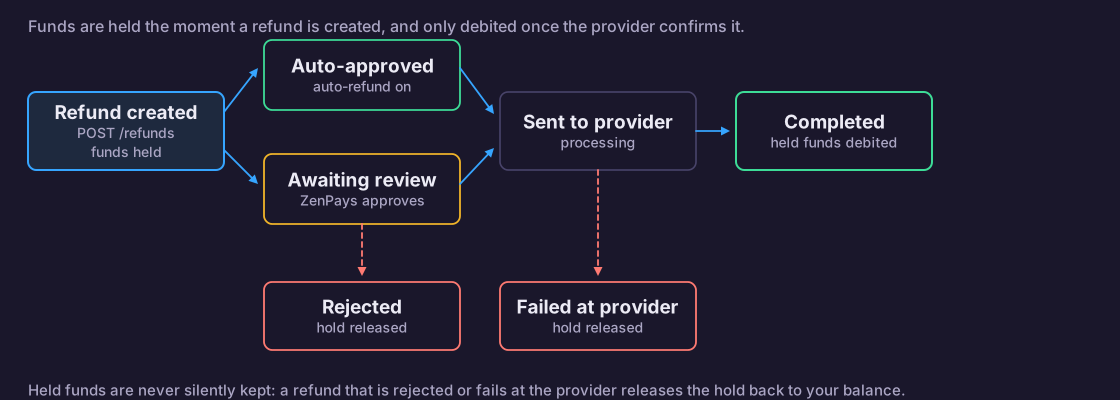
After a refund is created, it moves through these statuses:
| Status | What happens |
|---|---|
pending_approval | Refund created. The refund amount is blocked (escrowed) in the merchant wallet. Waiting for admin to approve or reject. |
approved | Admin approved. The refund is being sent to the payment provider. |
processing | Payment provider is executing the payout to the customer. |
completed | Payout succeeded. Blocked funds are debited from the merchant wallet. Transaction refundedAmount is updated. |
failed | Payment provider failed to process. Blocked funds are released back to the merchant wallet. |
rejected | Admin rejected the refund. Blocked funds are released back. |
cancelled | Merchant cancelled the refund before processing. Blocked funds are released back. |
Flow
                                    +---> rejected (funds released)
                                    |
pending_approval ---> approved ---> processing ---> completed (funds debited)
       |                                    |
       +---> cancelled (funds released)     +---> failed (funds released)
Auto-approval
If auto_refund_enabled is true in the merchant configuration, refunds skip pending_approval and go directly to processing.
Auto-cancellation
If a refund stays in pending_approval for 2 days without admin action, it is automatically cancelled and the blocked funds are released.
Partial Refunds
You can issue multiple partial refunds against the same transaction.
- Specify
amountto refund less than the full transaction amount. - The system tracks cumulative
refundedAmounton the transaction. - Each completed refund adds to the running total.
- Validation:
amountmust be ≤originalAmount - refundedAmount. - When cumulative refunds equal the transaction amount, the transaction becomes
refundedand no more refunds are accepted.
Example: three partial refunds on a 1000 INR transaction
| Refund | Amount | Transaction refundedAmount | Transaction Status |
|---|---|---|---|
| 1st | 300 | 300 | partial_refund |
| 2nd | 200 | 500 | partial_refund |
| 3rd | 500 | 1000 | refunded |
| 4th (rejected) | 1 | -- | Error: already fully refunded |
Transactions in partial_refund status still accept new refund requests. You do not need to wait for a pending refund to complete before creating the next one -- the system validates against cumulative completed refunds only.
Code Examples
- cURL
- JavaScript
- Python
- SDK (Recommended)
# Full refund
curl -X POST https://api.zenpayz.com/merchant/api/v1/refund-intents \
  -H "Authorization: Bearer zp_live_abc123def456" \
  -H "X-Timestamp: 2026-04-10T14:22:01.000Z" \
  -H "X-Signature: a1b2c3d4e5f6..." \
  -H "X-Secret-Salt: your_secret_salt" \
  -H "Content-Type: application/json" \
  -H "X-Idempotency-Key: refund-order-8842" \
  -d '{
    "transactionId": "txn_1774619159530_1_mn8yfmph_5iwb9b",
    "reason": "Customer requested full refund",
    "beneficiaryEmail": "rahul@example.com",
    "beneficiaryAccount": "50100012345678",
    "beneficiaryIfsc": "HDFC0001234"
  }'

# Partial refund
curl -X POST https://api.zenpayz.com/merchant/api/v1/refund-intents \
  -H "Authorization: Bearer zp_live_abc123def456" \
  -H "X-Timestamp: 2026-04-10T14:35:00.000Z" \
  -H "X-Signature: e5f6a7b8c9d0..." \
  -H "X-Secret-Salt: your_secret_salt" \
  -H "Content-Type: application/json" \
  -d '{
    "transactionId": "txn_1774700012000_1_abc12345_9z8y7x",
    "amount": 500,
    "reason": "Partial item return",
    "beneficiaryEmail": "priya@example.com",
    "beneficiaryAccount": "91020034567890",
    "beneficiaryIfsc": "SBIN0001234",
    "beneficiaryName": "Priya Sharma"
  }'
const crypto = require('crypto');

const apiKey = process.env.ZENPAYS_API_KEY;
const secretSalt = process.env.ZENPAYS_SECRET_SALT;
const timestamp = new Date().toISOString();

// Full refund
const body = {
  transactionId: 'txn_1774619159530_1_mn8yfmph_5iwb9b',
  reason: 'Customer requested full refund',
  beneficiaryEmail: 'rahul@example.com',
  beneficiaryAccount: '50100012345678',
  beneficiaryIfsc: 'HDFC0001234',
};

const signature = crypto
  .createHmac('sha256', secretSalt)
  .update(timestamp + JSON.stringify(body))
  .digest('hex');

const response = await fetch('https://api.zenpayz.com/merchant/api/v1/refund-intents', {
  method: 'POST',
  headers: {
    'Authorization': `Bearer ${apiKey}`,
    'X-Timestamp': timestamp,
    'X-Signature': signature,
    'X-Secret-Salt': secretSalt,
    'Content-Type': 'application/json',
    'X-Idempotency-Key': 'refund-order-8842',
  },
  body: JSON.stringify(body),
});

const result = await response.json();
console.log(result.data.refundId);  // refund_1774683026458_oann5ibjf
console.log(result.data.status);    // pending_approval
import hmac
import hashlib
import json
import os
from datetime import datetime, timezone
import requests

api_key = os.environ["ZENPAYS_API_KEY"]
secret_salt = os.environ["ZENPAYS_SECRET_SALT"]
timestamp = datetime.now(timezone.utc).strftime("%Y-%m-%dT%H:%M:%S.000Z")

# Full refund
body = {
    "transactionId": "txn_1774619159530_1_mn8yfmph_5iwb9b",
    "reason": "Customer requested full refund",
    "beneficiaryEmail": "rahul@example.com",
    "beneficiaryAccount": "50100012345678",
    "beneficiaryIfsc": "HDFC0001234",
}

data = timestamp + json.dumps(body, separators=(",", ":"))
signature = hmac.new(
    secret_salt.encode(),
    data.encode(),
    hashlib.sha256
).hexdigest()

response = requests.post(
    "https://api.zenpayz.com/merchant/api/v1/refund-intents",
    headers={
        "Authorization": f"Bearer {api_key}",
        "X-Timestamp": timestamp,
        "X-Signature": signature,
        "X-Secret-Salt": secret_salt,
        "Content-Type": "application/json",
        "X-Idempotency-Key": "refund-order-8842",
    },
    json=body,
)

result = response.json()
print(result["data"]["refundId"])  # refund_1774683026458_oann5ibjf
print(result["data"]["status"])    # pending_approval
import { ZenPays } from '@zenxdigitalholdings/zenpays'

const zenpays = new ZenPays({ apiKey: process.env.ZENPAYS_API_KEY })

// Full refund
const refund = await zenpays.refunds.create({
  transactionId: 'txn_1774619159530_1_mn8yfmph_5iwb9b',
  reason: 'Customer requested full refund',
  beneficiaryEmail: 'rahul@example.com',
  beneficiaryAccount: '50100012345678',
  beneficiaryIfsc: 'HDFC0001234',
})
console.log(refund.refundId) // refund_xxxxx

// Partial refund
const partialRefund = await zenpays.refunds.create({
  transactionId: 'txn_1774700012000_1_abc12345_9z8y7x',
  amount: 500,
  reason: 'Partial item return',
  beneficiaryEmail: 'priya@example.com',
  beneficiaryAccount: '91020034567890',
  beneficiaryIfsc: 'SBIN0001234',
  beneficiaryName: 'Priya Sharma',
})
Related Endpoints
- Get Refund -- Check refund status
- List Refunds -- List all refunds with filters
- Cancel Refund -- Cancel a pending refund
- Refund Stats -- Aggregate refund statistics
- Bulk Upload -- Create multiple refunds at once